It’s possible to go through life never knowing the difference between vector and raster graphics. Though, if you’re here reading this now, you’ve likely ran into some quality control issues, or you’re a keener whose wanting to learn more.
Great news: I can teach you the difference between vector and raster images in just a few minutes.
Vector images and raster images are different graphic types. I’m talking about opening up the file and looking at the way the graphic/image gets rendered or viewed in front of your eyes. I am not referring to the “type of file” the graphic is—be it a JPG, GIF, PNG, PDF, AI, EPS, etc.
What is a Raster Image? (The Pixel Grid)
A raster image is made up of tiny dots called pixels, kind of like a giant mosaic, and each pixel has its own colour. Stick thousands of these pixels together and they’ll make up an image.
For example a 4 x 6″ printed photograph is roughly made up 1800 pixels (wide) by 1200 pixels (tall). So these pixels are very tiny dots. Many pixels, in many colours, make up the image you see.
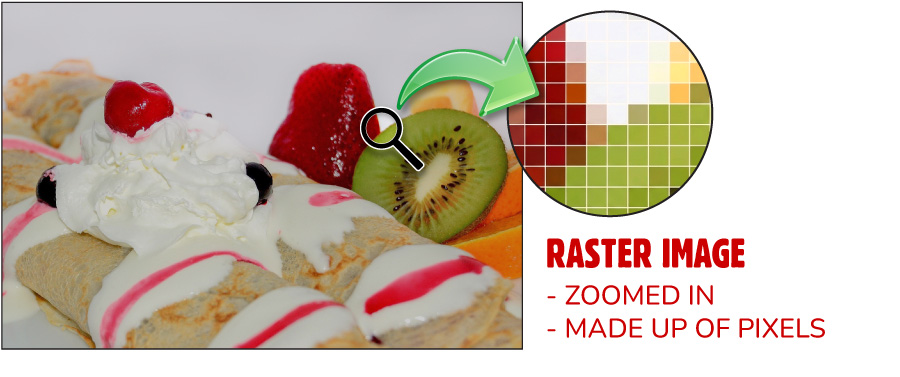
That’s it. You now understand raster images are made up a series of pixels.
What is Vector Image? (The Math Genius)
Unlike raster images, vector images don’t use pixels at all. Instead, the vector graphic is essentially a shape or curve made from a mathematical formula which is then filled in with a colour or colour gradient.
An example I always like to use is a computer font. Yes a font only shows letters and numbers on your screen like you’re already used to, but a font is also an excellent example of a vector graphic.
Think of a large letter A on your screen. The “shape” of the A is just a mathematical formula, and then filled in with black (or a colour if you’ve chosen that). That’s a vector graphic!
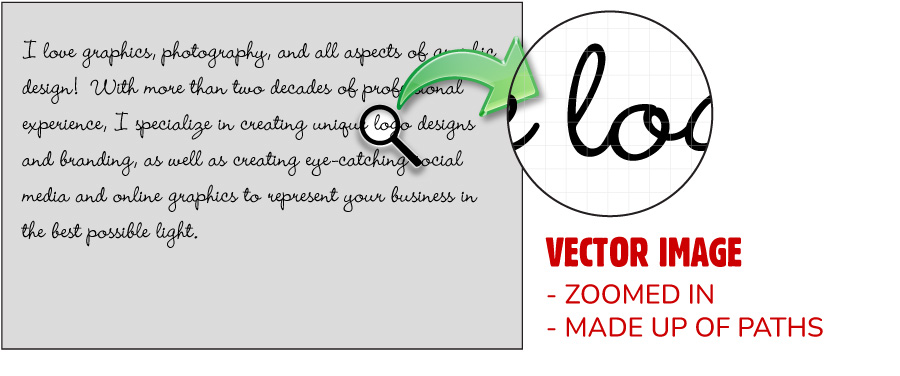
The reason I’ve chosen to use a font for an example of a vector graphic is because you’re familiar with how you can size the font larger or smaller and the letter A will always look crisp and sharp. You can make that “A” very very tiny or you can make it super-large so the “A” is bigger than your entire screen—and it always appears perfectly sharp and clear.
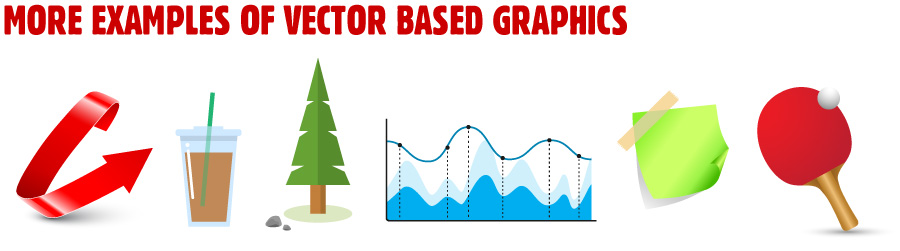
That’s actually one of the super-powers of vector graphics! You can scale the vector graphic to any size and it will always appear razor-sharp. From a 1-inch logo on a business card to a 10-foot-wide billboard, vector graphics always appear with perfect sharpness.
I Get the Difference, Now What?
Having an understanding that a raster image is a series of pixels, and that a vector graphic is a mathematical formula, you can now begin to grasp why one format may be beneficial over another. Let’s dig a little deeper.
Raster Images Get Blurry When Made Larger Than the Original
Imagine all those pixels making up your 4 inch wide image, and then imagine what happens when you print that image at three times the size, 12″ wide. Those pixels need to stretch-out to fill up the space, and instead of more detail being added, the same pixels being stretched out makes the image blurry. So if you have a raster-based image, you’ll be limited as to how large you can print/display the image before it gets blurry. As soon as you exceed its original size, pixels get added to fill the space (the computer takes a guess at which pixel colour should be added next to existing pixels) and therefore the image gets blurry. You can shrink a raster image and retain quality but you can not enlarge a raster image without it getting blurry.
Yes there are AI algorithms which try to “better guess” the pixels when enlarging a raster image, but the theory remains sound… raster images display worsened quality when enlarging beyond the original’s size.
Vector Images Scale Infinity
As the actual shape or design of a vector based graphic is just a mathematical formula filled in with a colour, the computer or printer only needs to take that formula and multiply it by a number to make it larger. In the simplest terms, if the shape is represented by the formula 5X, to make it ten times larger the computer only needs to say 10 times 5X, or 50X. Done. Same as the original, just larger, and still as clear as the smaller version.
When to Use Each Type
When the image you’re trying to display or reproduce is made up of tiny details or millions of colours (like a photo), you’d best use raster-based images. Think of employee headshots, beautiful photography displayed in your website’s header, portfolio photos, or social media posts.
If you have logos, icons, typography or layouts destined for a print shop, then you would use vector-based images. Usually vector-based graphics have limited colour palettes and do not have super-intricate details.
Note how almost all large companies use vector-based logos. This ensures their branding can be used in the widest range of applications whilst always looking razor-sharp! A few Canadian examples:
Final note about file extensions: It’s important for me to add that the file extension a graphic file has (JPG, GIF, PDF, AI, etc.) does NOT necessarily indicate whether the file is vector-based. A few statements are true: like all JPG or JPEG file types are raster-based images—because a JPG or JPEG has no ability to store any vector information (those mathematical curves, shapes or fills). However, after decades working in the graphic industry, I’ve experienced numerous times where I open up a file type which is supposed to contain vector-based artwork, and instead someone has just plopped a JPG inside their graphics software and chosen “Save As” from the file menu to give it a new extension such as AI, EPS or PDF. This does not make your raster images turn into vector images! It will have your image looking the exact same, but with a different file extension. Don’t judge by the file extension!
Bonus Reading: Graphic File Format Support
Here’s a loose idea of what graphic file types have the ability to support vector-based graphics:
| File Extension | Format Name | Supports Vector? | Best Used For… |
|---|---|---|---|
| .SVG | Scalable Vector Graphics | Yes (Pure Vector) | Web graphics, icons, logos, and responsive web design. |
| .AI | Adobe Illustrator Artwork | Yes (Hybrid) | Creating and editing original vector designs, logos, and illustrations. |
| .EPS | Encapsulated PostScript | Yes (Hybrid) | High-quality professional print production and legacy logo distribution. |
| Portable Document Format | Yes (Hybrid) | Document sharing, interactive forms, and print-ready artwork (can embed both). | |
| .PNG | Portable Network Graphics | No (Pure Raster) | Web images requiring transparency, screenshots, and digital UI elements. |
| .JPG / .JPEG | Joint Photographic Experts Group | No (Pure Raster) | Photographs and complex digital images where small file size matters. |
| .GIF | Graphics Interchange Format | No (Pure Raster) | Simple web animations and low-resolution graphics with limited colors. |
| .TIFF | Tagged Image File Format | No (Pure Raster) | High-quality desktop publishing, archiving, and raw photography printing. |
0 Comments